Meet the agents
Asite AI agents have dedicated roles to check project information the moment it is created, ensuring work goes through right the first time.
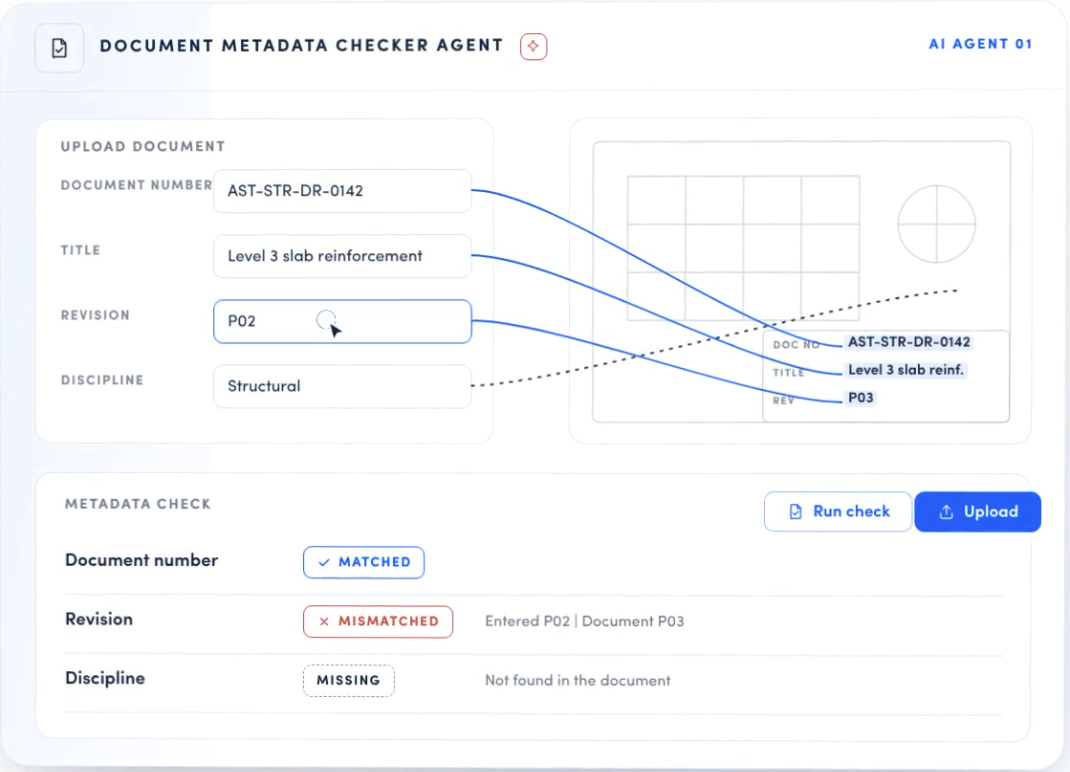
AI Metadata Reviewer: Clean data from the first upload.
Checks every document uploaded to the CDE against your metadata and naming rules, and flag gaps or errors before the file moves on. Teams work from information they can trust, without manually checking files so Information managers can focus on the uploads that need attention. Built for: Document Controllers, DMS Admins, Information Managers, BIM Managers, and Quality and Compliance teams.
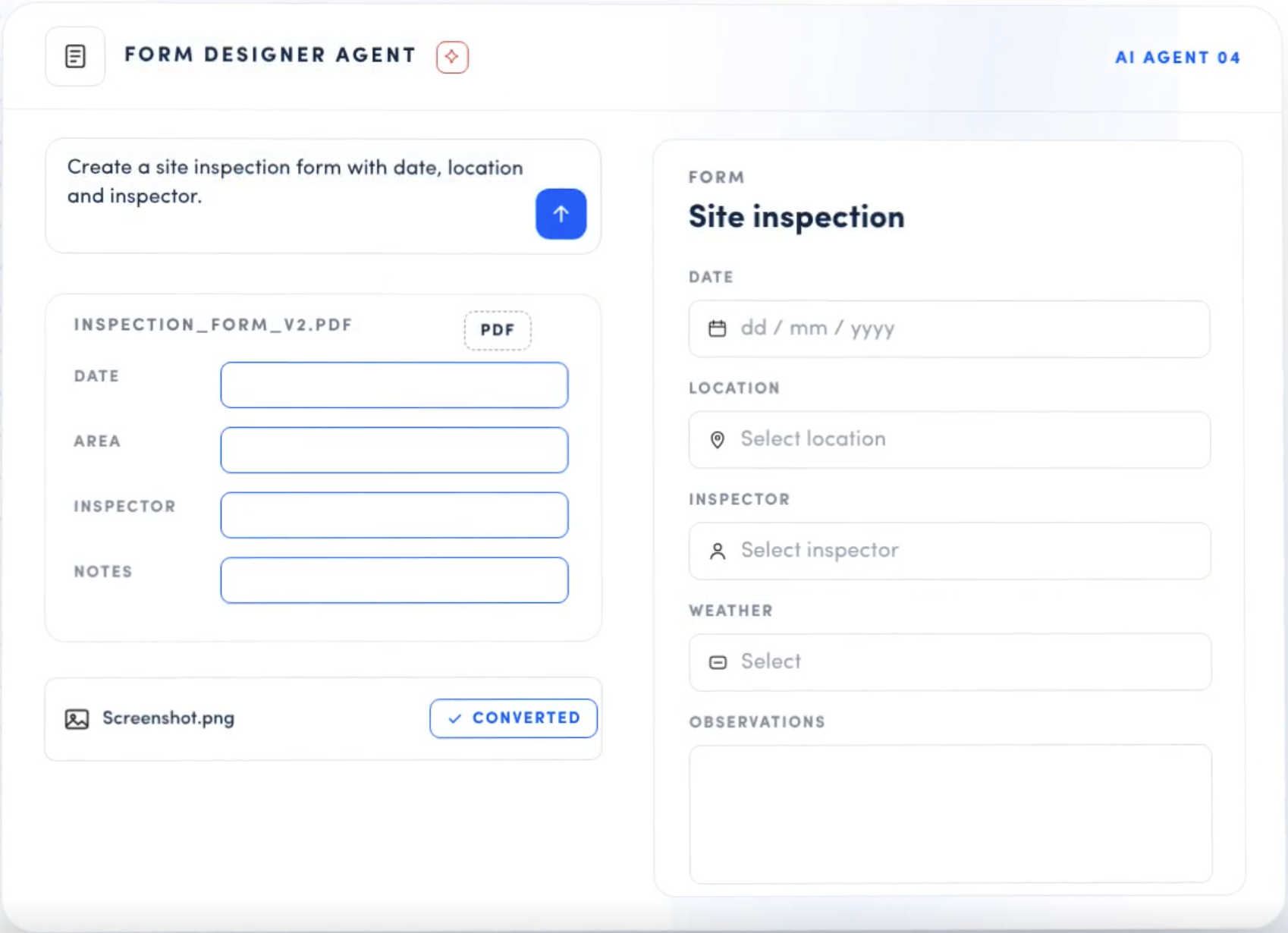
AI Form Template Generator: From idea to working form in minutes.
Describe the inspection, checklist or approval you need, and get a working form template. Anyone can build or adapt a form, not just the few experts who know the form builder, so paper and spreadsheet workarounds finally move into the CDE. Built for: QHSE, Quality and Site teams, process owners and Project Managers.
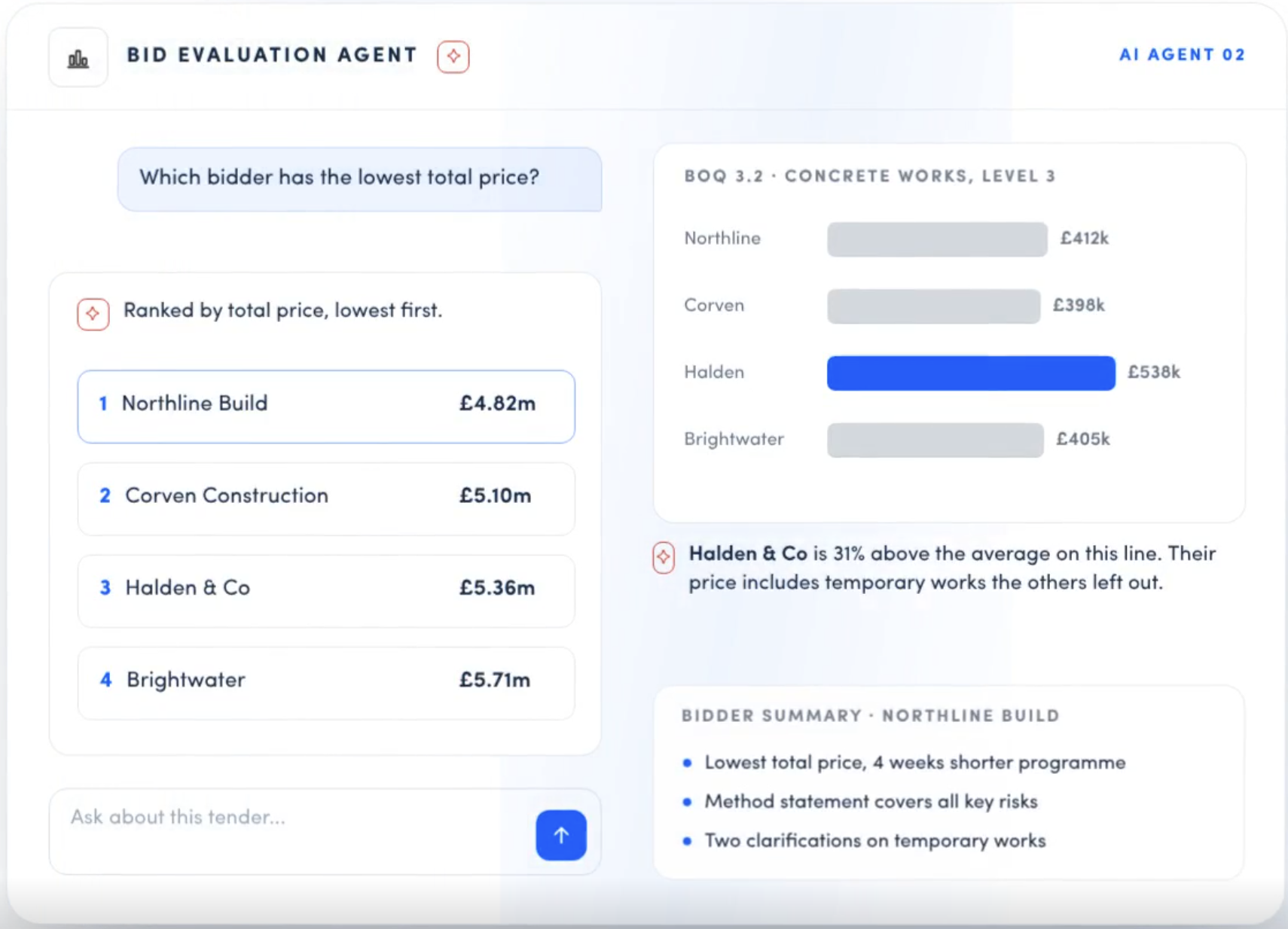
AI Bid Evaluator: Faster, more consistent, defensible tender decisions.
Load the bid responses and the agent compares them against your project’s requirements, surfacing scope gaps, missing information and non-compliance. Your panel spends its time on judgement, not line-by-line cross-checking, and every award has a clear record behind it. Built for: Procurement and Tender Managers, Commercial Managers, Quantity Surveyors, evaluation panels and Project Directors.
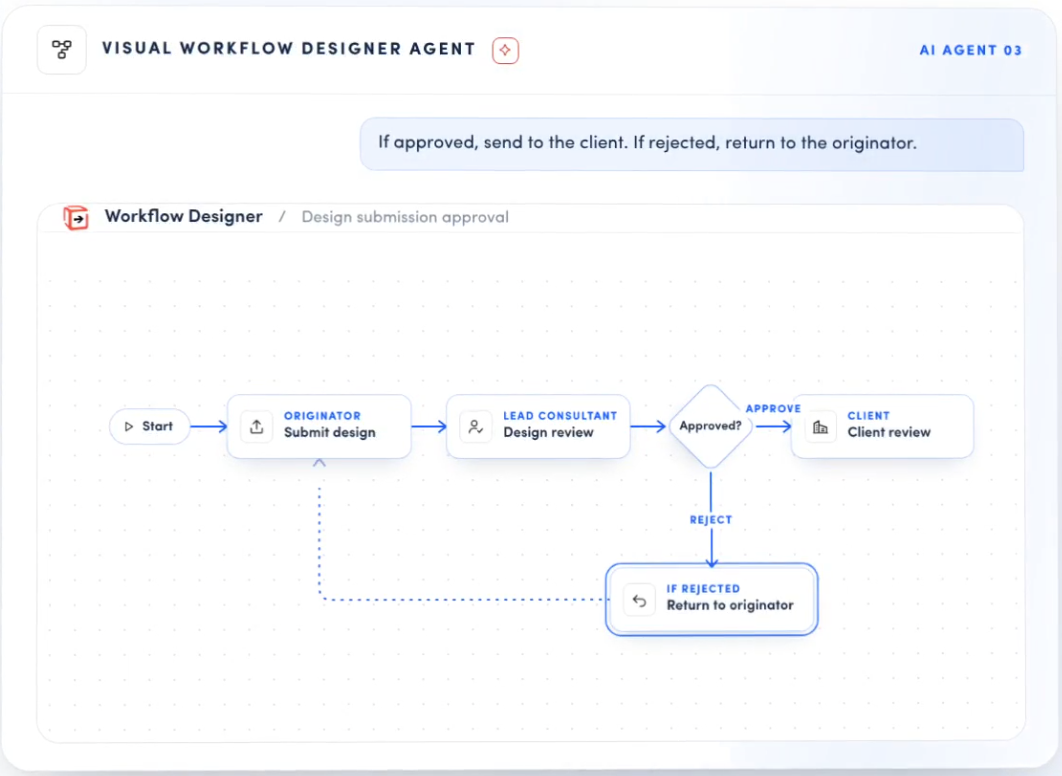
AI Workflow Designer: Turn process intent into a working approval route.
Describe a route in plain language, such as “design team reviews, then client approves within 10 days,” and the agent builds the workflow. Adapt it, reuse it as a standard, and change it in minutes when contracts or teams change. Built for: Workflow Administrators, System Configurators, Information Managers, Document Controllers and Project Managers.

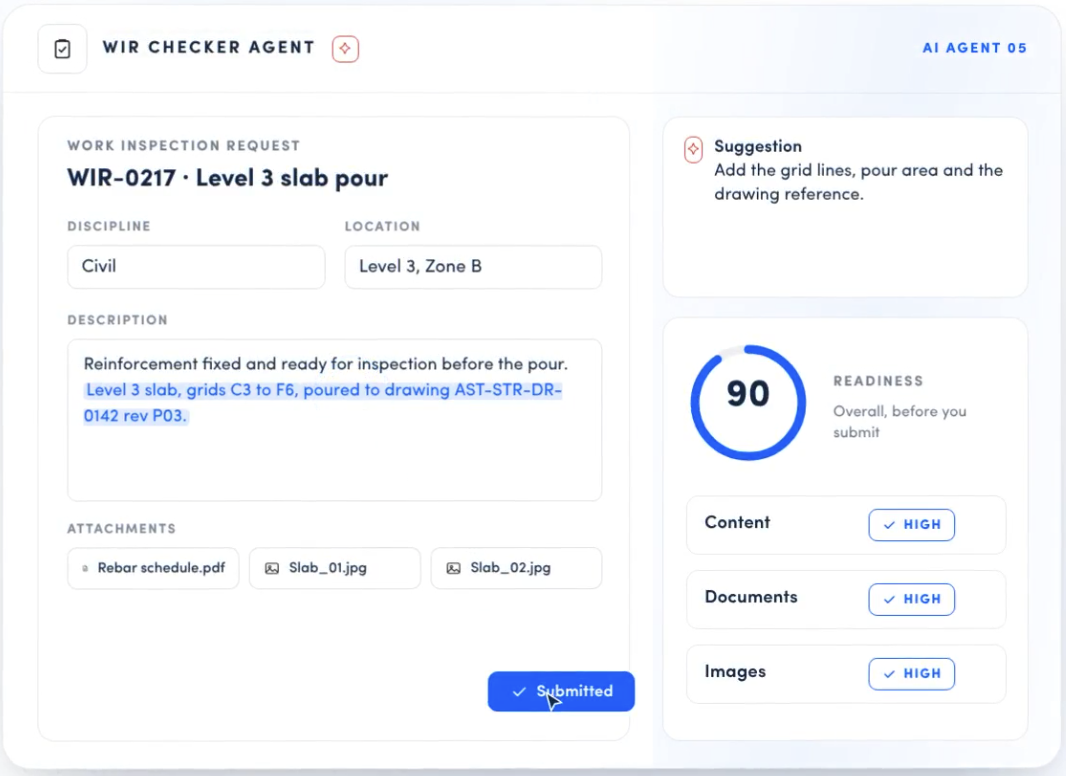
AI Work Inspection Request (WIR) Validator: Inspections approved first time, so work keeps moving.
Before a work inspection request is submitted, the agent checks it against your specs, drawings and approved method statements. Missing references, wrong drawing revisions and gaps against the spec are flagged up front, so inspections pass first time and the next activity can start. Built for: Site Engineers, Site Supervisors, Subcontractors, Inspection Engineers, Quality Managers and Construction Managers.
Why teams use Asite AI agents
Catch errors at the source
Problems are flagged when information is created, at upload, submission or tender, not weeks later when fixing them is slow and costly.
Grounded in your project
The agents check against your own specs, drawings, method statements, rules and requirements, not generic rules or memory.
For everyone, not just experts.
Describe a form or approval route in plain language and get a working draft. Configuration no longer waits on a few power users.
Consistent by default
One rule set, one evaluation approach and standard routes and templates, reused across every project and team.
Audit-ready from day one.
Clean metadata and clear decision records support ISO 19650 and client information requirements, with less clean-up before handover.
Keep the programme moving.
More first-time approvals and fewer resubmission cycles mean fewer delays on the critical path.
Asite AI Agents
See how Asite AI Agent assist with your projects
Frequently asked questions
What is Asite AI?
Asite AI is the suite of AI capabilities built into the Asite Common Data Environment. Its agents support teams across the asset lifecycle, from procurement and design through construction, handover and operation.
▼
Which agents are available?
The AI Metadata Reviewer, AI Bid Evaluator, AI Workflow Designer, AI Form Template Generator and AI WIR Validator.
▼
Do the agents replace my team’s decisions?
No. They do the checking and drafting, so your people can focus on judgement. Evaluation panels still score and award, reviewers still approve, and every draft form or workflow can be adapted before use.
▼
Do I need technical skills to use them?
No. With the Form Template Generator and Workflow Designer you describe what you need in plain language and get a working draft to refine.
▼
Can I apply different rules to different projects?
Yes. The Metadata Reviewer can apply one rule set per project, per folder or across your whole organisation.
▼
Do the agents support ISO 19650?
The Metadata Reviewer helps you apply your ISO 19650 and client information requirements to every upload, so records are consistent and audit-ready from day one.
▼
How do I get started?
For those new to Asite, please get in touch. For existing customers, please speak to your customer success manager or contact support.
▼
Case Study
Connecting the Public and Private Sector
Welsh Health Estates (WHE) is an all-Wales NHS organization that supports the NHS in Wales and the Welsh Assembly Government in all aspects of NHS estate, facilities, and property management.
READ THE CASE STUDY
Case Study
Thames Tideway Tunnel
The Thames Tideway Tunnel project will improve the sewer networks across London and the Thames Valley.
READ THE CASE STUDY
Case Study
Hollywood Hospital Expansion
Georgiou Group Pty Ltd is a national civil engineering and building construction company with offices in Western Australia, Queensland and New South Wales.
READ THE CASE STUDYBlogs
What Is BS 202001? A Comprehensive Guide for Project Controllers
BS 202001 is a British Standard that sets out project controls as an auditable specification. The current edition, BS 202001:2025, is voluntary unless a contract, client, or regulator requires it....
Asite
Blogs
How to Choose a Common Data Environment for BIM Teams
A common data environment (CDE) is the shared space where a project team creates, reviews, approves and stores its information. For BIM teams, it holds models, drawings and documents in one place. IT...
Asite
Blogs
Asite Customer Forum 2026: Celebrating the People Behind Complex Projects
Last week, Asite was thrilled to welcome a handful of customers to our London HQ for the Customer Forum 2026. This blog explores some of the highlights from the day, including stories shared by...